Module 4 · Authentication and user management
4.2 Registration, login and sessions
Store sessions in PostgreSQL, sign the session cookie, register and log users in and out, and follow the cookie from Set-Cookie to the session row to req.user.
Starting point
Users exist in the database with argon2id hashes. There are no login pages, and HTTP itself has no memory: each request arrives on its own.
Outcome
migrations/004_create_session_table.sqlsrc/middleware/auth.js (loadUser)src/routes/auth.js (register, login, logout)views/auth/ login.ejs register.ejstest/auth.test.jsYou can register, log in as alice@example.test / password123, see your name in the header, and log out. You can explain exactly how the server knows who sent a request.
The problem
After a successful login the browser will send many more requests: the dashboard, an issue, a form post. None of them contains the password, and we do not want them to. The server needs a way to recognise "the same person who logged in a minute ago".
The standard answer is a server-side session:
- At login the server creates a session record,
{ userId: 1 }, stored on the server, under a long random ID. - It sends that ID to the browser in a cookie:
Set-Cookie: caretaker.sid=.... - The browser sends the cookie back with every request to the same site.
- The server looks up the session by ID, reads
userId, and loads the user.
The browser only ever holds a random ID. It cannot read or change userId, because that lives on the server.
Build it
1. Install the session middleware and a store
npm install express-session@1.19.0 connect-pg-simple@10.0.0
added 9 packages, and audited 122 packages in 2s
37 packages are looking for funding
run `npm fund` for details
found 0 vulnerabilitiesexpress-sessioncreates sessions, sets and reads the cookie, and exposes the session asreq.session.connect-pg-simplestores sessions in a PostgreSQL table. The default store keeps them in process memory, which, as we saw in lesson 1.5, loses everything on restart and cannot be shared by two processes.
2. The session table
This is the table definition that connect-pg-simple documents, as a migration:
CREATE TABLE session ( sid varchar NOT NULL PRIMARY KEY, sess json NOT NULL, expire timestamp(6) NOT NULL); CREATE INDEX session_expire_idx ON session (expire);sid is the session ID, sess the session data as JSON, and expire when it stops being valid. The store deletes expired rows periodically; the index makes that cheap.
npm run db:migrate
> caretaker@1.0.0 db:migrate
> node --env-file=.env scripts/migrate.js
applied 004_create_session_table.sql
migrations are up to date3. A secret for signing cookies
express-session signs the cookie with a secret: it appends an HMAC of the session ID. If anyone changes the cookie, the signature no longer matches and the server ignores it. The secret must be long, random and private. Generate one and append it to your .env:
echo "SESSION_SECRET=$(node -e "console.log(require('node:crypto').randomBytes(32).toString('hex'))")" >> .envrandomBytes(32) gives 256 random bits, printed as 64 hexadecimal characters. Document the variable in .env.example, without a real value:
# Set to 1 to print every SQL statement the app runs.LOG_SQL=0# Required. Generate with:# node -e "console.log(require('node:crypto').randomBytes(32).toString('hex'))"SESSION_SECRET=Show the whole .env.example after this change
# Copy this file to .env and adjust if needed. Never commit .env.DATABASE_URL=postgres://caretaker:caretaker_dev_password@localhost:5433/caretakerPORT=3000# Set to 1 to print every SQL statement the app runs.LOG_SQL=0# Required. Generate with:# node -e "console.log(require('node:crypto').randomBytes(32).toString('hex'))"SESSION_SECRET=Tests get a fixed, obviously fake value:
LOG_SQL=0SESSION_SECRET=test-only-secret-never-use-this-anywhere-realShow the whole .env.test after this change
# Settings for automated tests. Local learning values only; safe to commit.NODE_ENV=testDATABASE_URL=postgres://caretaker:caretaker_dev_password@localhost:5433/caretaker_testPORT=3001LOG_SQL=0SESSION_SECRET=test-only-secret-never-use-this-anywhere-realAnd src/config.js requires it, so the app refuses to start without one:
logSql: process.env.LOG_SQL === '1', env: process.env.NODE_ENV ?? 'development', sessionSecret: required('SESSION_SECRET'),};Show the whole src/config.js after this change
function required(name) { const value = process.env[name]; if (!value) { throw new Error(`Missing required environment variable ${name}. Copy .env.example to .env.`); } return value;} export const config = { port: Number(process.env.PORT ?? 3000), databaseUrl: required('DATABASE_URL'), logSql: process.env.LOG_SQL === '1', env: process.env.NODE_ENV ?? 'development', sessionSecret: required('SESSION_SECRET'),};4. Load the user on every request
Create src/middleware/auth.js:
import { findUserById } from '../models/users.js'; // Turns the session's userId into req.user (or null) for every request.export async function loadUser(req, res, next) { req.user = null; if (req.session.userId) { req.user = await findUserById(req.session.userId); if (!req.user) { // The account no longer exists. Forget it. delete req.session.userId; } } res.locals.currentUser = req.user; next();}- The only input is
req.session.userId, which comes from the server-side session row, never from the request body, query string or a header. - We load the user from the database on every request. If the account is deleted, the next request is anonymous. (Module 7 relies on the same idea for revoked permissions.)
res.localsis likeapp.locals, but for one request. Every template can now usecurrentUser.
5. Wire sessions into the app
import express from 'express';import path from 'node:path';import session from 'express-session';import connectPgSimple from 'connect-pg-simple';import { config } from './config.js';import { pool } from './db.js';import { loadUser } from './middleware/auth.js';import { authRouter } from './routes/auth.js';app.locals.formatDate = (value) => new Date(value).toLocaleString('en-IE', { dateStyle: 'medium', timeStyle: 'short', timeZone: 'UTC' });app.locals.currentUser = null; const PgSession = connectPgSimple(session);app.use(express.urlencoded({ extended: false }));app.use(session({ store: new PgSession({ pool, tableName: 'session', pruneSessionInterval: config.env === 'test' ? false : 900 }), name: 'caretaker.sid', secret: config.sessionSecret, resave: false, saveUninitialized: false,}));app.use(loadUser); app.use(authRouter);Show the whole src/app.js after this change
import express from 'express';import path from 'node:path';import session from 'express-session';import connectPgSimple from 'connect-pg-simple';import { config } from './config.js';import { pool } from './db.js';import { loadUser } from './middleware/auth.js';import { authRouter } from './routes/auth.js';import { issuesRouter } from './routes/issues.js';import { organisationsRouter } from './routes/organisations.js';import { buildingsRouter } from './routes/buildings.js';import { inspectionsRouter } from './routes/inspections.js';import { getDashboard } from './models/dashboard.js'; export const app = express(); app.set('view engine', 'ejs');app.set('views', path.join(import.meta.dirname, '..', 'views'));app.locals.formatDate = (value) => new Date(value).toLocaleString('en-IE', { dateStyle: 'medium', timeStyle: 'short', timeZone: 'UTC' });app.locals.currentUser = null; const PgSession = connectPgSimple(session); app.use((req, res, next) => { if (process.env.NODE_ENV === 'test') { return next(); } const started = Date.now(); res.on('finish', () => { console.log(`${req.method} ${req.originalUrl} -> ${res.statusCode} (${Date.now() - started} ms)`); }); next();}); app.use(express.static(path.join(import.meta.dirname, '..', 'public')));app.use(express.urlencoded({ extended: false }));app.use(session({ store: new PgSession({ pool, tableName: 'session', pruneSessionInterval: config.env === 'test' ? false : 900 }), name: 'caretaker.sid', secret: config.sessionSecret, resave: false, saveUninitialized: false,}));app.use(loadUser); app.use(authRouter); app.get('/', async (req, res) => { res.render('dashboard', { title: 'Dashboard', dashboard: await getDashboard() });}); app.use('/issues', issuesRouter);app.use('/organisations', organisationsRouter);app.use('/buildings', buildingsRouter);app.use('/inspections', inspectionsRouter); app.use((req, res) => { res.status(404).render('not-found', { title: 'Not found', path: req.originalUrl });}); app.use((err, req, res, next) => { const status = err.status ?? 500; if (status >= 500) { console.error(err); } const message = err.expose ? err.message : 'Something went wrong'; res.status(status).render('error', { title: 'Error', status, message });});The options, one by one:
store: the PostgreSQL store, using our existing pool. In tests we switch off its background clean-up timer, which would otherwise try to use the pool after the tests close it.name: the cookie name. The default,connect.sid, tells everyone which library you use.secret: the signing key.resave: false: do not write the session back to the store if the request did not change it.saveUninitialized: false: do not create a session (or set a cookie) for visitors until something is stored in it. Anonymous visitors get no cookie at all.app.locals.currentUser = nullis a default for pages rendered beforeloadUserruns, such as an error page.app.use(authRouter)mounts the auth routes at the root:/login,/register,/logout.
6. The auth routes
Create src/routes/auth.js:
import express from 'express';import { createUser, verifyCredentials, normaliseEmail } from '../models/users.js';import { PG_ERRORS } from '../db.js';import { cleanText } from '../lib/validation.js'; export const authRouter = express.Router(); const EMAIL_PATTERN = /^[^\s@]+@[^\s@]+\.[^\s@]+$/; function validateRegistration(input) { const errors = {}; const name = cleanText(input.name, { min: 1, max: 100 }); const email = normaliseEmail(input.email); const password = typeof input.password === 'string' ? input.password : ''; if (!name.ok) errors.name = 'Enter your name (up to 100 characters).'; if (!EMAIL_PATTERN.test(email) || email.length > 254) errors.email = 'Enter a valid email address.'; if (password.length < 10 || password.length > 200) errors.password = 'Use a password of 10 to 200 characters.'; return { errors, values: { name: name.text, email }, password };} authRouter.get('/register', (req, res) => { res.render('auth/register', { title: 'Create an account', values: {}, errors: {} });}); authRouter.post('/register', async (req, res) => { const { errors, values, password } = validateRegistration(req.body ?? {}); if (Object.keys(errors).length > 0) { return res.status(400).render('auth/register', { title: 'Create an account', values, errors }); } let user; try { user = await createUser({ ...values, password }); } catch (err) { if (err.code === PG_ERRORS.UNIQUE_VIOLATION) { return res.status(400).render('auth/register', { title: 'Create an account', values, errors: { email: 'An account with this email already exists.' } }); } throw err; } req.session.userId = user.id; res.redirect(303, '/');}); authRouter.get('/login', (req, res) => { res.render('auth/login', { title: 'Log in', email: '', error: null });}); authRouter.post('/login', async (req, res) => { const email = normaliseEmail(req.body?.email); const user = await verifyCredentials(email, req.body?.password); if (!user) { return res.status(401).render('auth/login', { title: 'Log in', email, error: 'Email or password is incorrect.' }); } req.session.userId = user.id; res.redirect(303, '/');}); authRouter.post('/logout', (req, res, next) => { req.session.destroy((err) => { if (err) return next(err); res.clearCookie('caretaker.sid'); res.redirect(303, '/login'); });});- Login stores one fact in the session:
userId. Not the name, not a role, not the email. Everything else is loaded fresh byloadUser. - Failed login is
401with one generic message, and the email is kept in the field. The password never is. - Logout is a
POST. AGET /logoutcould be triggered by any image tag on any page (<img src="/logout">). State-changing actions usePOST. req.session.destroydeletes the session row;clearCookietells the browser to drop the cookie.- On registration, telling the user "an account with this email already exists" reveals that the email is registered. Many sites accept that trade-off for usability; a stricter design sends an email instead and always shows the same message.
7. Views and navigation
<%- include('../partials/head') %><h1>Log in</h1><form method="post" action="/login" class="form" novalidate> <% if (error) { %><div class="error-summary" role="alert"><p><%= error %></p></div><% } %> <div class="field"> <label for="email">Email</label> <input id="email" name="email" type="email" value="<%= email %>" autocomplete="username" required> </div> <div class="field"> <label for="password">Password</label> <input id="password" name="password" type="password" autocomplete="current-password" required> </div> <div class="form-actions"> <button type="submit" class="btn btn-primary">Log in</button> <a class="btn" href="/register">Create an account</a> </div></form><%- include('../partials/foot') %><%- include('../partials/head') %><h1>Create an account</h1><form method="post" action="/register" class="form" novalidate> <div class="field<%= errors.name ? ' has-error' : '' %>"> <label for="name">Name</label> <input id="name" name="name" value="<%= values.name ?? '' %>" autocomplete="name"> <% if (errors.name) { %><p class="field-error"><%= errors.name %></p><% } %> </div> <div class="field<%= errors.email ? ' has-error' : '' %>"> <label for="email">Email</label> <input id="email" name="email" type="email" value="<%= values.email ?? '' %>" autocomplete="username"> <% if (errors.email) { %><p class="field-error"><%= errors.email %></p><% } %> </div> <div class="field<%= errors.password ? ' has-error' : '' %>"> <label for="password">Password</label> <input id="password" name="password" type="password" autocomplete="new-password"> <p class="hint">At least 10 characters. A passphrase of several words works well.</p> <% if (errors.password) { %><p class="field-error"><%= errors.password %></p><% } %> </div> <div class="form-actions"> <button type="submit" class="btn btn-primary">Create account</button> <a class="btn" href="/login">I already have an account</a> </div></form><%- include('../partials/foot') %>The header shows who is logged in:
<a href="/organisations">Organisations</a> </nav> <div class="user-nav"> <% if (currentUser) { %> <span>Signed in as <strong><%= currentUser.name %></strong></span> <form method="post" action="/logout"><button type="submit" class="link-button">Log out</button></form> <% } else { %> <a class="link-button" href="/login">Log in</a> <% } %> </div>Show the whole views/partials/nav.ejs after this change
<header class="site-header"> <div class="container header-inner"> <a class="brand" href="/">Caretaker</a> <nav class="main-nav" aria-label="Main"> <a href="/issues">Issues</a> <a href="/inspections">Inspections</a> <a href="/organisations">Organisations</a> </nav> <div class="user-nav"> <% if (currentUser) { %> <span>Signed in as <strong><%= currentUser.name %></strong></span> <form method="post" action="/logout"><button type="submit" class="link-button">Log out</button></form> <% } else { %> <a class="link-button" href="/login">Log in</a> <% } %> </div> </div></header>Run and inspect
npm run dev
> caretaker@1.0.0 dev
> node --env-file=.env --watch src/server.js
Caretaker listening on http://localhost:3000Log in with curl. -c saves cookies the server sets into a file (a "cookie jar"); -b sends them back later:
curl -si -c /tmp/caretaker-cookies.txt http://localhost:3000/login -d email=alice@example.test -d password=password123
HTTP/1.1 303 See Other
X-Powered-By: Express
Location: /
Vary: Accept
Content-Type: text/plain; charset=utf-8
Content-Length: 27
Set-Cookie: caretaker.sid=s%3AZgYwWC5JrwoHGuDexubnNgMqRnxdFOYl.2jGCNJ4IBgCt63FaGae%2FCE7%2FX3If%2FwGvc3Be9yV4FqE; Path=/; HttpOnly
Date: Sat, 28 Nov 2026 14:40:55 GMT
Connection: keep-alive
Keep-Alive: timeout=5
See Other. Redirecting to /Read the response: 303 See Other to /, and a Set-Cookie header. The value starts with s%3A, the URL-encoded s: that marks a signed cookie: the session ID, a dot, then the signature. HttpOnly means JavaScript in the page cannot read the cookie.
Send the cookie back and look for the name:
curl -s -b /tmp/caretaker-cookies.txt http://localhost:3000/ | grep "Signed in"
<span>Signed in as <strong>Alice Byrne</strong></span>Now look at the server side of the same session:
docker compose exec db psql -U caretaker caretaker, then paste the SQL.SELECT left(sid, 8) || '…' AS sid, sess, expire FROM session; sid | sess | expire
-----------+-----------------------------------------------------------------------------------------+---------------------
ZgYwWC5J… | {"cookie":{"originalMaxAge":null,"expires":null,"httpOnly":true,"path":"/"},"userId":1} | 2026-11-29 14:40:56
(1 row)The sess JSON holds the cookie settings and "userId":1. That number is all the server remembers about the login. Here is the whole chain for this request:
Without the cookie the same request is anonymous, and no cookie is set at all, because saveUninitialized is false:
curl -si http://localhost:3000/ | grep -E "Set-Cookie|Log in</a>"
<a class="link-button" href="/login">Log in</a>Log in through the browser as well:
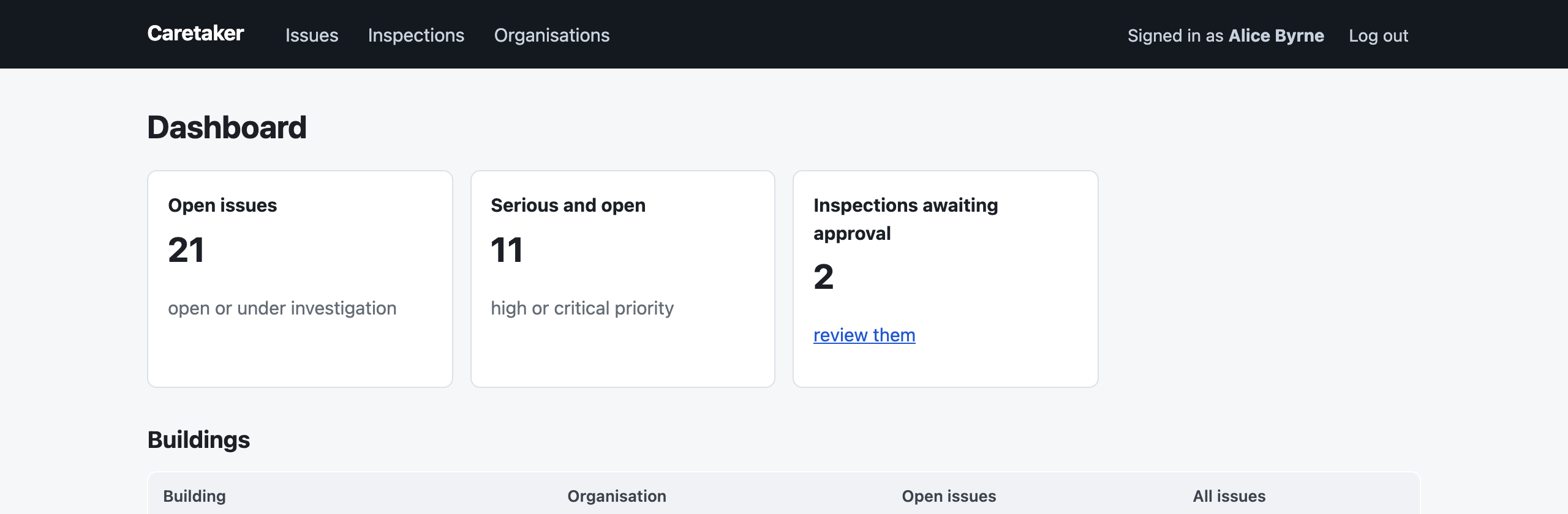
Experiment
What if someone edits the cookie? The cookie jar is a text file with one cookie per line and tab-separated fields; the seventh field is the value. This awk command replaces the last character of the signature with X and writes a copy:
awk 'BEGIN { FS = OFS = "\t" } $6 == "caretaker.sid" { $7 = substr($7, 1, length($7) - 1) "X" } { print }' /tmp/caretaker-cookies.txt > /tmp/caretaker-tampered.txt
curl -s -b /tmp/caretaker-tampered.txt http://localhost:3000/ | grep -E "Signed in|Log in</a>"
<a class="link-button" href="/login">Log in</a>Reveal Answer
Anonymous. express-session recomputed the HMAC, it did not match, so it ignored the cookie as if none had been sent. Guessing a valid cookie would require guessing both a random session ID that exists and its signature.
Finally, log out and try the old cookie again:
curl -si -b /tmp/caretaker-cookies.txt -X POST http://localhost:3000/logout | head -1
HTTP/1.1 303 See Othercurl -s -b /tmp/caretaker-cookies.txt http://localhost:3000/ | grep -E "Signed in|Log in</a>"
<a class="link-button" href="/login">Log in</a>docker compose exec db psql -U caretaker caretaker, then paste the SQL.SELECT count(*) AS sessions FROM session; sessions
----------
1
(1 row)The session row is gone, so the old cookie points at nothing. This is the big advantage of server-side sessions: logging out (or an administrator ending a session) takes effect immediately.
Checkpoint
import { test, before, after } from 'node:test';import assert from 'node:assert/strict';import request from 'supertest';import { app } from '../src/app.js';import { pool } from '../src/db.js';import { resetDatabase } from './helpers.js'; before(resetDatabase);after(() => pool.end()); test('a correct login creates a session and shows the user', async () => { const agent = request.agent(app); const res = await agent.post('/login').type('form').send({ email: 'alice@example.test', password: 'password123' }); assert.equal(res.status, 303); assert.match(res.headers['set-cookie'][0], /^caretaker\.sid=s%3A.+; Path=\/; HttpOnly/); const home = await agent.get('/'); assert.match(home.text, /Signed in as <strong>Alice Byrne<\/strong>/);}); test('a wrong password or unknown email gets the same 401 and no session', async () => { for (const email of ['alice@example.test', 'mallory@example.test']) { const res = await request(app).post('/login').type('form').send({ email, password: 'wrong-password' }); assert.equal(res.status, 401); assert.match(res.text, /Email or password is incorrect/); assert.equal(res.headers['set-cookie'], undefined); }}); test('registration validates, creates a user, and logs them in', async () => { const agent = request.agent(app); const bad = await agent.post('/register').type('form').send({ name: 'Erin', email: 'not-an-email', password: 'short' }); assert.equal(bad.status, 400); assert.match(bad.text, /Enter a valid email address/); assert.match(bad.text, /Use a password of 10 to 200 characters/); const good = await agent.post('/register').type('form').send({ name: 'Erin Walsh', email: 'Erin@Example.test', password: 'correct horse battery' }); assert.equal(good.status, 303); assert.match((await agent.get('/')).text, /Signed in as <strong>Erin Walsh<\/strong>/); const { rows } = await pool.query("SELECT email FROM users WHERE name = 'Erin Walsh'"); assert.deepEqual(rows, [{ email: 'erin@example.test' }]);}); test('registering an existing email is a field error', async () => { const res = await request(app).post('/register').type('form').send({ name: 'Alice Again', email: 'alice@example.test', password: 'another long password' }); assert.equal(res.status, 400); assert.match(res.text, /already exists/);}); test('logout destroys the session', async () => { const agent = request.agent(app); await agent.post('/login').type('form').send({ email: 'bob@example.test', password: 'password123' }); await agent.post('/logout'); assert.match((await agent.get('/')).text, /Log in<\/a>/);});request.agent(app) is a Supertest client that keeps cookies between requests, like a browser.
npm test
> caretaker@1.0.0 test
> node --env-file=.env.test --test --test-concurrency=1 --test-reporter=spec "test/**/*.test.js"
✔ a correct login creates a session and shows the user (249.34325ms)
✔ a wrong password or unknown email gets the same 401 and no session (45.659625ms)
✔ registration validates, creates a user, and logs them in (44.289792ms)
✔ registering an existing email is a field error (24.035167ms)
✔ logout destroys the session (35.685709ms)
✔ a building can be created inside an organisation (210.650041ms)
✔ a duplicate building name in the same organisation is a field error (4.003166ms)
✔ the same building name is allowed in another organisation (8.124625ms)
✔ a building with issues cannot be deleted (21.097708ms)
✔ an empty building can be deleted (7.09725ms)
✔ an organisation with buildings cannot be deleted, an empty one can (13.981916ms)
✔ the dashboard counts match the database (216.166667ms)
✔ every building appears with its organisation (4.552416ms)
✔ create a draft, edit it, submit it, approve it (218.276625ms)
✔ invalid transitions are refused with 409 and change nothing (8.585125ms)
✔ only drafts can be edited (3.454125ms)
✔ returning a submitted inspection makes it editable again (5.896833ms)
✔ concurrent approvals: exactly one wins (19.937125ms)
✔ unknown actions are 404 (1.198041ms)
✔ the list pages 10 at a time and reports the total (225.452584ms)
✔ pages do not overlap (10.750166ms)
✔ filters combine with AND (4.185875ms)
✔ sorting by priority puts critical first when descending (3.963625ms)
✔ unknown sort keys and SQL in the query string are ignored (20.871917ms)
✔ GET /issues lists issues from the database (218.121458ms)
✔ GET /issues/101 shows one issue with its building (3.476542ms)
✔ GET /issues/:id answers 404 for unknown or malformed ids (9.349792ms)
✔ POST /issues re-renders the form with errors (6.268833ms)
✔ POST /issues stores the issue and redirects to it (7.000417ms)
✔ POST /issues with a building that does not exist is a form error, not a 500 (10.191583ms)
✔ the stored row has the cleaned values and ignores a client-sent status (3.567125ms)
✔ an issue time in the future is rejected (2.612042ms)
✔ GET /issues/101/edit shows the current values (2.415292ms)
✔ POST /issues/:id/edit changes the status and updated_at (2.937875ms)
✔ POST /issues/:id/delete removes the issue (5.64775ms)
✔ GET /organisations lists organisations with building counts (188.577541ms)
Show 12 more lines
✔ GET /organisations/1 shows its buildings, not other organisations' buildings (3.769ms)
✔ POST /organisations validates and creates (11.052584ms)
✔ POST /organisations/:id/edit renames the organisation (4.326292ms)
✔ unknown organisations are 404 (4.640292ms)
ℹ tests 40
ℹ suites 0
ℹ pass 40
ℹ fail 0
ℹ cancelled 0
ℹ skipped 0
ℹ todo 0
ℹ duration_ms 2804.393167git add -A
git commit -m "Registration, login and sessions"
[main 52d5ca4] Registration, login and sessions
13 files changed, 325 insertions(+)
create mode 100644 migrations/004_create_session_table.sql
create mode 100644 src/middleware/auth.js
create mode 100644 src/routes/auth.js
create mode 100644 test/auth.test.js
create mode 100644 views/auth/login.ejs
create mode 100644 views/auth/register.ejsSymptom Missing required environment variable SESSION_SECRET
The echo ... >> .env step did not run, or ran in another folder. Open .env and check for a SESSION_SECRET= line with a long value.
Symptom relation "session" does not exist
Run npm run db:migrate. Tests migrate their own database automatically.
Symptom You log in, but the next page is anonymous
The cookie was not sent back. In curl, use -b with the same file you passed to -c. In a browser, check that you use http://localhost:3000, not 127.0.0.1: cookies belong to a host name.
Recap and next step
A session is a server-side record found through a signed, random cookie. Login stores userId; loadUser turns it into req.user on every request from the database. Logout deletes the record. Passwords are checked once, at login, and never travel again.
But logging in is still optional: every page works without it. Next we require a login, fix a subtle attack on session IDs, and choose cookie settings deliberately.
Open the checkpoint files for lesson 4.2 (separate page; only files from this lesson and earlier)